Admin Guide
Agent Access
The agent endpoint lets a remote agent (a hosted AI product, a CI job) use a user's subscribed MCPs over Streamable HTTP at /mcp, with a bearer token the user granted. Admins turn it on and manage OAuth clients. Users approve and revoke access.
Turn it on
The endpoint is off by default. Enable it in the server config. When it is off, /mcp, /oauth/* and /.well-known/oauth-* return 404, and the user Agent Access page is not shown.
agent_endpoint:
  enabled: true
  dynamic_client_registration: false # default
  # issuer_url: https://ambassador.example.com:9443
  # resource_base_url: https://ambassador.example.com:8443
| What | Where |
|---|---|
| MCP endpoint (Streamable HTTP) | https://<host>:8443/mcp |
| Authorization server metadata | https://<host>:9443/.well-known/oauth-authorization-server |
| Authorize, token, register, revoke | https://<host>:9443/oauth/* |
| Consent screen | https://<host>:9443/app/oauth/consent |
The issuer and resource URLs come from configuration, never from the request Host header. Set issuer_url and resource_base_url when the server is behind a proxy or tunnel: the resource an agent sends must match <resource_base_url>/mcp exactly, or the authorization request is rejected with invalid_target.
Reachability
The agent must be able to reach the endpoint. Agents run by external platforms can't reach a private network or tailnet host unless you expose it, for example through a tunnel or reverse proxy.
Defaults you can change under agent_endpoint: access tokens from the OAuth flow last 15 minutes or the grant's remaining time, whichever is shorter (access_token_ttl_seconds), grants default to 1 hour (default_grant_ttl_seconds) with a 24 hour maximum (max_grant_ttl_seconds), and rotating refresh tokens are on (refresh_tokens_enabled).
Admin: Agent Endpoint
Open Agent Endpoint in the admin area.
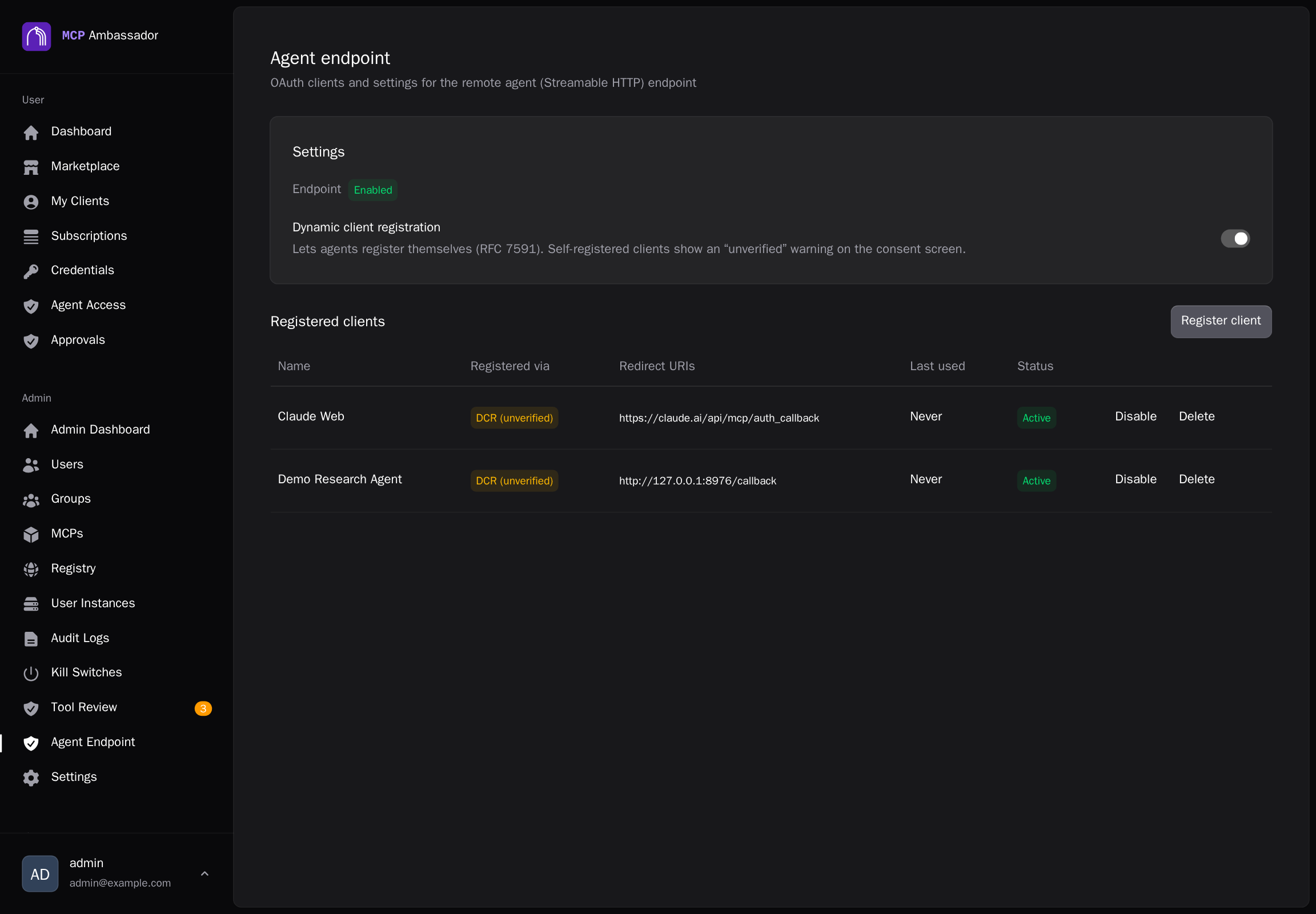
- Dynamic client registration. When on, agents can register themselves (RFC 7591). Clients registered this way show as DCR (unverified) and the consent screen warns the user that the client is unverified. Turn it off (the default) to allow only clients an admin registers, with exact redirect URIs. Redirect URIs are matched exactly. The toggle is also available over the admin API (
PUT /v1/admin/agent-endpoint/settings), and clients under/v1/admin/oauth-clients. - Registered clients. Each row shows the name, how it was registered (Admin or DCR), redirect URIs, last used and status. Register client adds one yourself. Disable stops new authorizations from a client, and Delete removes it.
User: Agent Access
Open Agent Access in the user area. It lists the grants you have given to remote agents. Revoke on a row, or Revoke all, takes effect immediately.
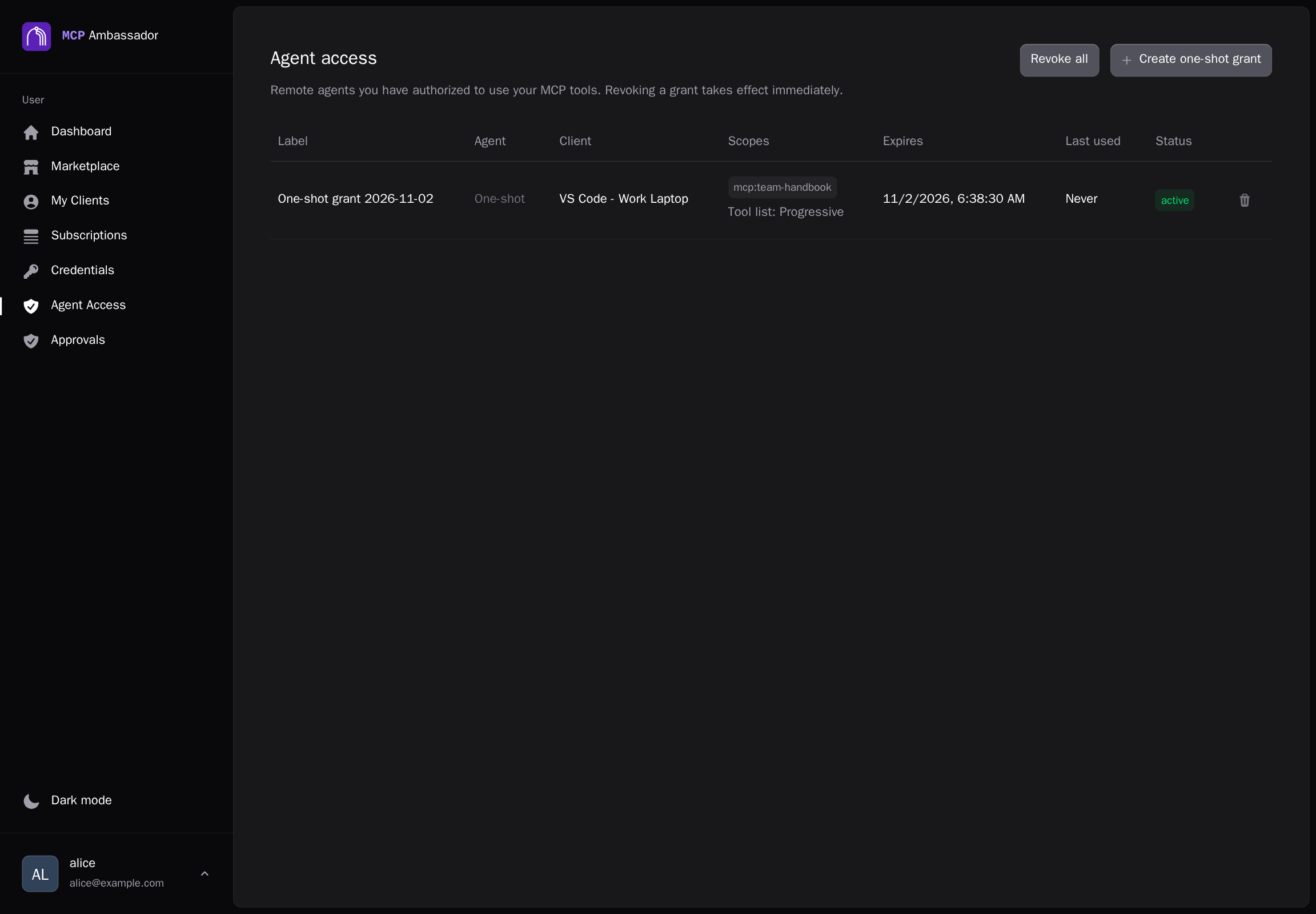
A grant is bound to one of your Ambassador clients, so the agent can use only that client's active subscriptions, and only what your groups already allow. Tool pinning, kill switches, group tool policy and approval gates apply to agent calls the same way.
Authorizing an agent (OAuth consent)
When an agent starts an OAuth flow, you are sent to a consent screen. It shows the client name and a Verified client or Unverified client badge, and lets you choose:
- the Ambassador client the grant is bound to;
- the Allowed MCPs, from that client's subscriptions;
- an optional Tool allowlist;
- how long Access lasts, and an optional label;
- the Tool list mode, Full or Progressive (see Progressive Disclosure).
Approving gives the agent a short-lived access token and, for this flow, a rotating refresh token capped by the grant's lifetime. Reuse of a refresh token revokes the whole token family. Denying the request grants nothing.
One-shot grants
For CI or scripts that can't run an OAuth flow, choose Create one-shot grant. Pick the client, the allowed MCPs (or all current subscriptions), an optional tool allowlist, an expiry and the Tool list mode. A one-shot grant has no refresh token: its token lives as long as the grant. The token is shown once; copy it then. It is not shown again.
What an agent can do
Every grant is bound to exactly one of your active Ambassador clients. A call is allowed only if it is within the token's scope and your live permissions, checked on every call. Removing a subscription, changing group membership or flipping a kill switch takes effect at once, even for tokens already issued. Disabling the bound client ends its grants.
| Scope | Meaning |
|---|---|
mcp:<name> | Tools from one subscribed MCP |
mcp:* | All MCPs the client is subscribed to |
| tool allowlist | Optional: limit a scope to named tools |
/mcp accepts POST only with Authorization: Bearer <token>. A request without a valid token gets 401 with a WWW-Authenticate header that points to the protected-resource metadata, so OAuth-capable agents can find the authorization server. An authenticated GET gets 405 (unauthenticated: 401). A token in the query string is rejected. Tokens are never forwarded to downstream MCPs. After a revoke, the next request fails with 401.
Grant creation, token issue, refresh and revoke, and authentication failures are written to the audit log. Raw tokens are not logged.
Related
- Progressive Disclosure: the Tool list setting on a grant.
- Approval Gates: human approval for sensitive tool calls.
- Tool Pinning: agents see only approved tool definitions.