Admin Guide
Tool Pinning
Tool pinning stops a downstream MCP from silently changing what an agent reads. Every tool definition is hashed; a changed definition waits for an admin decision while the last approved version keeps serving.
Why pinning?
Agents read tool descriptions as trusted context. A downstream MCP, or a compromised package update, can change a description later (a "rug pull") or plant hidden instructions in one (tool poisoning). That is a prompt-injection channel that bypasses grants, scopes and kill switches. Pinning closes the silent-change channel: the agent reads only an approved version (approved by an admin, by auto for first-seen tools, or by the one-time baseline), and any later change waits for review. Pinning does not decide whether a definition is malicious; the flags help you review, but approving poisoned text still serves it.
How it works
For each tool, Ambassador hashes the definition: name, title, description, inputSchema, outputSchema, annotations and icons when present. The hash is SHA-256 over the RFC 8785 (JCS) canonical form. _meta and unknown fields are stripped. Definitions larger than 64 KB (canonical form) can't be approved: they are blocked, and a manual approve returns 409.
On every discovery or reconnect (and on periodic re-discovery, every 6 hours by default), Ambassador compares each tool's hash with its pin:
- Same hash: nothing happens.
- Changed tool: the new definition is queued as pending review. The previously approved version keeps being served. The tool does not vanish and does not fall back to the new text.
- New tool: it has no approved version yet, so it is hidden until approved.
- Rejected change: the same pending hash is not raised again.
- Tool removed downstream: the pin is kept and marked absent. If the tool returns changed, it goes back to review.
The agent always receives the approved definition, never the live one, on /v1/tools, /mcp tools/list, and when arguments are validated. A tool with no approved version is invisible, and calling it by name fails as an unknown tool. Kill switches and authorization still apply on top.
Pins are per MCP and per scope. A per-user MCP whose tool hash equals the approved shared pin for the same MCP is treated as approved, so only definitions that differ raise a per-user review item.
Pin policy
Each MCP has a pin_policy that decides what happens the first time a tool is seen:
| Policy | First-seen tools | Later changes |
|---|---|---|
review | Start pending review | Pending review |
auto | Approved automatically | Pending review |
- Every MCP starts with
review. An admin can switch an admin-created (custom) MCP toauto; registry and imported MCPs can't. - Existing tools keep serving after an upgrade through the one-time baseline.
autotrusts first-seen definitions without review. The admin UI asks you to confirm before switching to it. Usereviewfor any source you do not control.
Approval, by an admin, by auto or by the baseline, is what makes a definition servable; approving poisoned text still serves it. Pinning does not protect against a malicious first definition under auto, or against malicious tool behaviour or results.
The baseline at upgrade
When you upgrade to a version with pinning, a one-time baseline runs at the first discovery. It compares each live definition with a snapshot of the MCP's catalog entry taken when it was published or last validated. That snapshot is frozen when the baseline arms, and it also records which scopes existed at that time:
- Equal and clean: approved as
system:migration, so the upgrade does not hide anything. - Anything else: pending review. A version that was rejected or revoked in any scope is never approved by the baseline (or by
auto).
"Clean" means no flags other than the informational ones (see Flags). Injection-heuristic flags, blocking flags and a mismatch with the snapshot always disqualify a tool.
Tools approved by the baseline have never been reviewed by a human. They are listed under Baseline, never human-reviewed until an admin confirms them. The baseline runs once and does not re-arm. Scopes that did not exist at that point, such as users added later, go through normal review.
The Tool Review screen
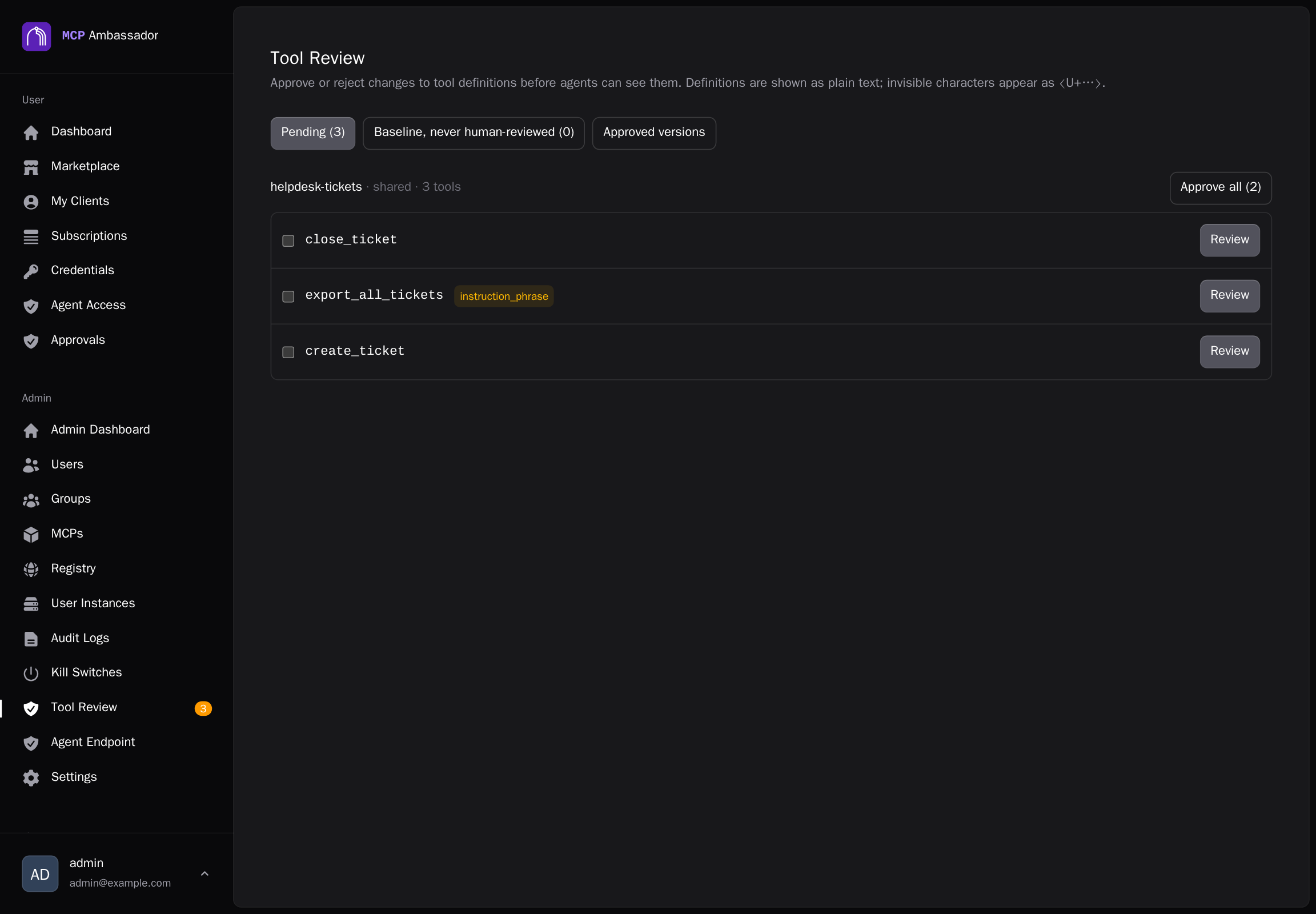
Open Tool Review in the admin area. A badge shows how many items are waiting.
| Tab | Shows | Actions |
|---|---|---|
| Pending | Changed or new definitions awaiting a decision | Review (approve or reject), Revoke if a version is being served |
| Baseline, never human-reviewed | Tools approved by system:migration | Review (confirm baseline), Revoke |
| Approved versions | Every pin that has an approved version, whatever its status | Revoke |
The review dialog shows a field-level diff against the approved version, and the flags raised. Everything is shown as plain text: no Markdown or HTML is rendered, invisible characters such as zero-width and bidi characters appear visibly (for example ⟨U+200B⟩), and long text is collapsed behind a Show all control. For definitions over 2,000 characters, Approve stays disabled until you have opened the full text.
Approve all / Approve selected
On the Pending tab, each MCP's group has bulk buttons, so you do not have to open every item:
- Approve all (N) approves every unflagged pending tool of that MCP; N is the number of unflagged tools.
- Tick the checkboxes to pick tools and use Approve selected (N).
- A confirmation dialog, "Approve N tools of MCP?", shows how many unflagged tools will be approved and how many flagged tools are excluded. The confirm button reads Approve N.
- Tools with flags (other than the purely informational length flags) are excluded. To include them, tick Also approve the N flagged tools; the button becomes Continue… and a second dialog, "Really approve N flagged tools?", must be confirmed with Yes, approve flagged tools. Flags that block approval can never be bulk-approved.
- A tool whose definition changed after you loaded the list is skipped (reported as
stale), not approved. The same goes for any tool the server refuses for another reason, such as a previously revoked definition. The page shows "Approved X, skipped Y" and refreshes the list. - Every approval is audited per tool, as with a single approval.
The bulk endpoint, POST /v1/admin/mcps/:mcpId/tool-pins/approve, takes 1-200 pins per request; the Tool Review screen splits larger sets into several requests automatically.
Approving a per-user item can apply to just that scope or to all users of the MCP. If the shared pin already holds a different pending item, the request is refused with a baseline_conflict error and nothing changes.
A scope is held when it reaches 200 pending items, and an MCP is held automatically after 5 rejections in 24 hours. Revokes do not count toward that. A held scope keeps serving its approved definitions and records no new pending items.
Revoke
Revoke withdraws an approved version. Use it when a version you approved turns out to be bad.
- The tool is hidden from agents immediately.
- It is withdrawn everywhere that version is approved: every pin for the same MCP and tool whose approved hash matches is revoked together, in shared and per-user scopes, with one audit event.
- A revoked version is never re-raised, and is excluded from baseline and auto-approval.
- A pending change on the same pin is kept and can still be approved or rejected. A newly approved definition makes the tool visible again.
- Revoke works on any pin that has an approved version, whatever its status, so a queued change cannot shield the version currently being served.
- The request names the exact approved hash. If the pin changed in the meantime, or has no approved version, the server answers
409; an unknown pin answers404.
What the agent sees
Descriptions served to agents are truncated to 500 Unicode code points. The hash and the admin review cover the full text. The review dialog shows the agent-visible prefix and where it is cut, and the truncated_on_serve flag marks descriptions over 500. This applies on every path, including /v1/tools and /mcp.
Flags
When a definition is scanned, flags are attached and shown in the review dialog. The injection-heuristic flags are advisory: they never approve or reject anything by themselves. Four flags are blocking, meaning the definition can't be approved (a manual approve returns 409) and can only be rejected:
reserved_name: the tool name starts with the reservedambassador__prefix.invalid_definition: the definition is malformed.duplicate_name: the same tool name appears twice in onetools/list; both entries are hidden.canonical_too_large: the canonical form is over 64 KB; it is stored as a size marker plus hash.
The scan looks for instruction-like phrases, references to other tools or files, hidden or bidi Unicode, very long descriptions, base64-like blobs and markup. It covers every string in inputSchema, outputSchema and annotations. Other flags include:
pattern_unsupported: a schemapatternthat the safe regex engine cannot compile. That pattern is dropped from validation; the rest of the schema is still enforced.long_descriptionandtruncated_on_serveare informational: they do not stop a published tool from being approved by the baseline.
The rule set is versioned, and each flag records the version.
Admin API
| Method | Path | Purpose |
|---|---|---|
GET | /v1/admin/tool-pins | List pins. Filters include status, mcp_id, scope, baseline=unreviewed and serving=true; cursor-paginated |
GET | /v1/admin/tool-pins/summary | Pending and baseline counts, and held MCP scopes (drives the badge) |
GET | /v1/admin/tool-pins/:pinId | One pin with its approved and pending definitions, for the diff |
POST | /v1/admin/tool-pins/:pinId/approve | Approve the pending definition |
POST | /v1/admin/tool-pins/:pinId/reject | Reject the pending definition |
POST | /v1/admin/tool-pins/:pinId/revoke | Withdraw an approved version |
POST | /v1/admin/tool-pins/:pinId/confirm-baseline | Confirm a system:migration pin as human-reviewed |
PATCH | /v1/admin/mcps/:mcpId/pin-policy | Set pin_policy (auto is refused with 400 for registry and imported MCPs) |
Approve, reject, revoke and confirm-baseline take the hash you reviewed as expected_hash, so a decision always applies to exactly the definition you looked at. Pin decisions are audited with hashes only, never definition text.