Admin Guide
Kill Switches
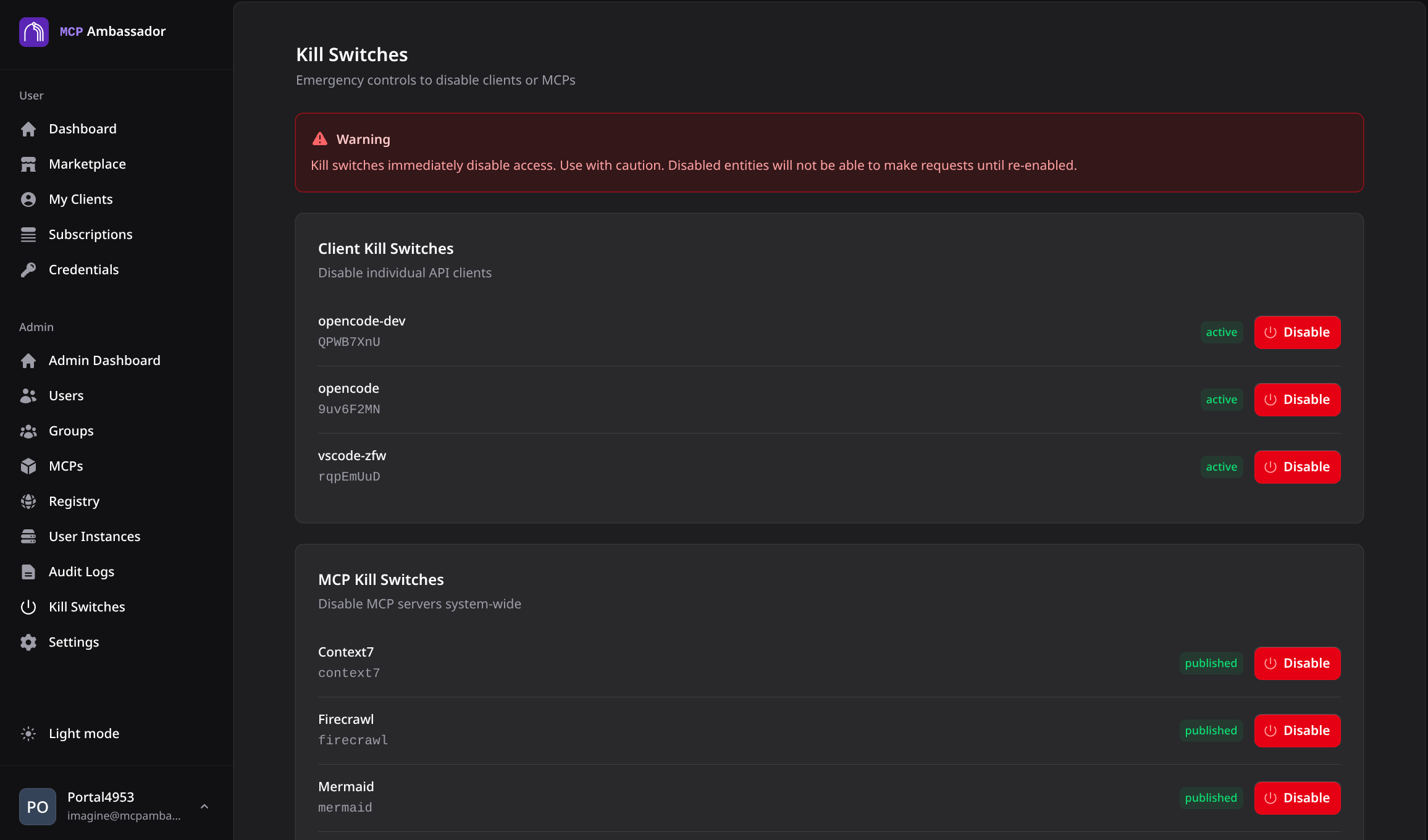
Kill switches let admins disable a client, a specific tool or an entire MCP across all users — no redeployment, no config changes, no client restarts required.
Why kill switches?
When an MCP tool is behaving unexpectedly or a security issue is discovered, you need to stop it immediately:
- An AI agent is making too many API calls via the Stripe MCP
- A GitHub tool is touching repositories it shouldn't
- A newly published tool has a bug
Kill switches take effect on the next request. They are checked on every tool list and every call, so no session restart is needed.
Targets
A kill switch has one target. Three kinds exist, all set through the same admin endpoint:
| Target | Example | Blocks |
|---|---|---|
client:<client_id> | client:3f2a… | Every tool for one client |
mcp:<mcp name> | mcp:github | Every tool of one MCP, for all users and clients |
tool:<mcp_id>:<tool_name> | tool:9b1c…:delete_repo | One tool of one MCP, for all users and clients |
# Activate (enabled: true) or clear (enabled: false)
curl -k -b cookies.txt \
  -X POST https://localhost:9443/v1/admin/kill-switch/mcp:github \
  -H "Content-Type: application/json" \
  -d '{"enabled": true}'

# List the active switches
curl -k -b cookies.txt https://localhost:9443/v1/admin/kill-switches
Client and MCP switches are also available on the Kill Switches page of the admin UI.
Tool-level kill switch
Disables one tool of one MCP and leaves the rest of that MCP, and a same-named tool on another MCP, working. It is the way to remove a tool for everyone, including users whose groups offer it: a group tool policy only narrows what one group offers, and a tool offered by any of a user's groups stays available, but a kill switch wins over every group.
curl -k -b cookies.txt \
  -X POST https://localhost:9443/v1/admin/kill-switch/tool:MCP_ID:delete_repo \
  -H "Content-Type: application/json" \
  -d '{"enabled": true}'
- Use the MCP's catalog id (the UUID from
GET /v1/admin/mcps), not its name. Activating a tool switch for an id that is not in the catalog is rejected (404), so a typo can't silently kill nothing. - The tool name is matched exactly, with no case folding or trimming. URL-encode the target if the name contains
/,?,#or%. - The tool is hidden, not just blocked. A killed tool is absent from the client's tool list, the agent's tool list, and
ambassador__search_toolsandambassador__describe_toolresults. A direct call fails with the kill-switch error. - API only. The admin UI does not yet have a per-tool toggle.
- A killed tool never creates an approval request, and activating a switch voids the open approval requests it covers.
MCP-level kill switch
Disables the entire MCP, all tools, across all users.
# Disable
curl -k -b cookies.txt \
  -X POST https://localhost:9443/v1/admin/kill-switch/mcp:MCP_NAME \
  -H "Content-Type: application/json" \
  -d '{"enabled": true}'

# Re-enable
curl -k -b cookies.txt \
  -X POST https://localhost:9443/v1/admin/kill-switch/mcp:MCP_NAME \
  -H "Content-Type: application/json" \
  -d '{"enabled": false}'
Here the target uses the MCP's name; only the tool target uses the catalog id.
Kill switch vs archive
| Kill Switch | Archive | |
|---|---|---|
| Effect | Blocks tool calls; MCP stays in catalog | Removes MCP from catalog and marketplace |
| Reversibility | Toggle on/off instantly | Requires re-publish |
| User subscriptions | Preserved | Lost |
| Audit history | Preserved | Preserved |
| Use case | Temporary disable, incident response | Permanent removal |
Use a kill switch for operational incidents; use archiving for removing an MCP permanently.
Persistence and audit
Active switches are stored in the database, so they survive a server restart. Clearing one removes it immediately.
Every activation and deactivation is written to the audit trail as an admin_action event (kill_switch_activate or kill_switch_deactivate) with the target, the actor, and whether it was persisted. If saving fails, the switch still holds in the running process, but the request returns an error to tell you it will not survive a restart. Press Kill again to retry.